
Sound Profile can show its own “current profile” notification on the lock screen. To enable it, follow these steps:
1) Enable the option inside Sound Profile
- Open Sound Profile
- Open the menu ☰
- Go to Settings
- Find the Sound Profile notifications section
- Enable: Display Sound Profile on the lock screen

2) Check Android notification category settings
Now tap on Notifications: Show or Hide Sound Profile notifications in the Notifications bar. This will open Android’s notification settings for Sound Profile.
- Under Notification categories, tap on the text Sound Profile notification displaying the current profile
- Make sure the main switch is ON
- Set Lock screen to Show all notification content
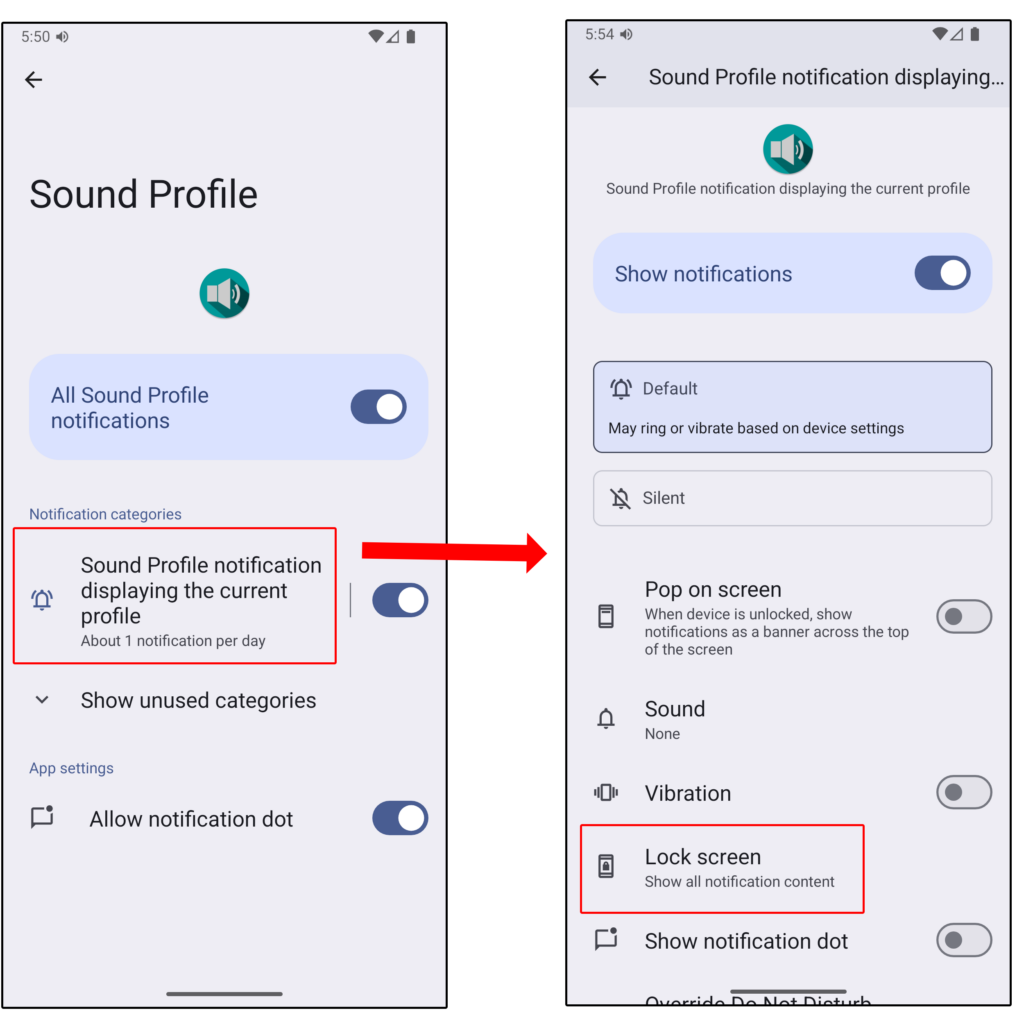
In most devices, this is enough to make the notification appear on the lock screen. However, on some phones Android may still hide it unless the notification category uses “Default” importance. If that happens, continue with step 3.
3) If it still doesn’t appear, do this (important on some devices)
On some devices, the notification only shows on the lock screen if this category is set to Default importance.
Inside the same notification category:
- Set Importance to Default (may ring or vibrate based on device settings)
- If you don’t want sound when a profile is activated, set Sound to None
- If you don’t want vibration, disable Vibration
4) Test
- Press Back several times to return to Sound Profile
- Activate your Normal profile (or any profile)
- Lock the device
- Check whether the Sound Profile notification is now visible on the lock screen
If you had to follow step 3, it may be an Android/device restriction (or a bug), because the notification should be allowed on the lock screen just by setting Lock screen to Show all notification content.
Do you think this is an Android bug or an Android restriction? Leave a comment below with your phone model, Android version and your opinion.
No, sorry, it is not.