
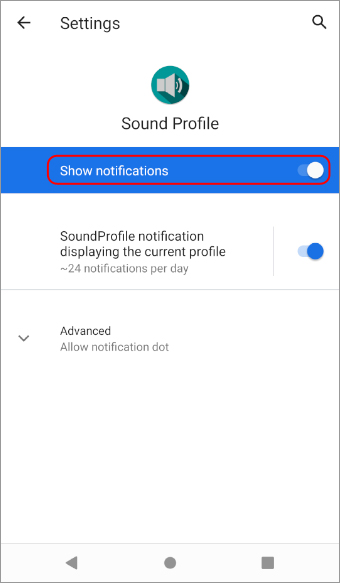
Sound Profile displays the current profile icon in the Notification bar showing which profile is currently active. If you want to hide that notification follow these steps:
- Open Sound Profile and tap on the menu

- Tap on Settings
- Scroll down to Notifications. Tap on it and set the values as you need.
Sound Profile is able to extend its own notification and display in it your favorite profiles. This way you could activate them quickly from the notification dropdown list. Tap here for more info.
The icon in the notification bar used to show the icon of the current sound profile selected..
Now it only shows the normal sound icon despite the profile being on silent or night mode..it used to show the speaker/ and crescent moon icon
How do we get that back so that we know the current sound profile?
Hello Francis,
Sound Profile creates the notification using the appropriate icon for the currently active profile. It works correctly for most Android devices, however, some manufacturer customizations may ignore that icon and show the standard app icon instead.
This is not something controlled directly by Sound Profile. The app is already sending the correct icon, but some devices do not display it properly in the status bar.
👉 Xiaomi
On some Xiaomi devices, this may happen when the notification shade style is set to MIUI instead of Android.
A user reported that changing this solved the issue:
Xiaomi Settings > Notifications > Notification shade
Then change it from MIUI to Android
👉 Honor Magic
On some Honor Magic devices, this may be related to the notification being shown as a discrete notification.
Please try this:
Honor Magic > Settings > Apps > Sound Profile > Notifications > Notification type
Then switch OFF Discrete notification
👉 OnePlus
On some OnePlus devices, this seems to be a system bug. In those cases, Sound Profile sends the correct icon, but the system still shows the normal app icon instead.
Unfortunately, if that is the cause, there may be no way for the app to force the correct icon to appear again.
If your device is a OnePlus, I would recommend contacting OnePlus support and reporting the problem, because it appears to be an issue in the system itself.
If you tell me your phone brand and model, I will try to check whether there is any known workaround for your device.
Hi! I cannot find setting that adds profile options to Notification bar. (I had previous phone set up so that when you click drop down arrow, it showed different profiles. Any of those profiles could be selected from Notification Bar instead of opening app.) Is this still available? Thanks!
Please try the Extended Notification
Is there an option in the app to hide only the icon of the specific profile? I think, there was such an option in the older version. But I can’t find it now.
Hello
Sorry, that option is not available anymore. Android become more tricky now.
Can You add please possibility to pin SoundProfile on the top of notifications list?